Storyboard AI Generator: Adobe vs Alternatives
When people search for a "storyboard AI generator Adobe," they are usually comparing Adobe's world-class creative suite (Photoshop, Illustrator, After Effects, Premiere Pro) with a storyboard-first tool. Adobe excels at post-production polish. Storyboard Creator AI is different: it is purpose-built for planning and generating storyboards end to end, with AI-native workflows that Adobe does not provide out of the box.
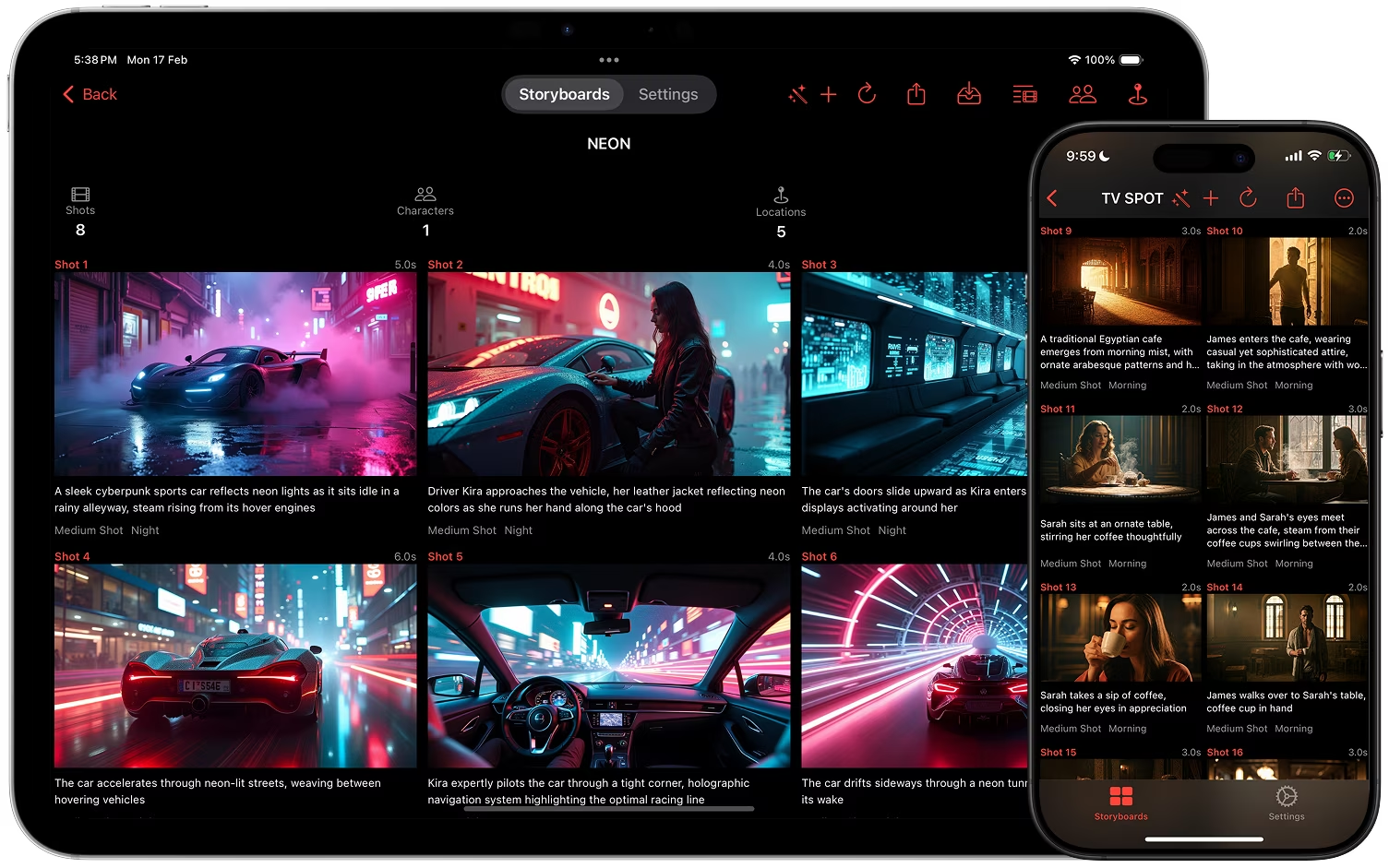
What Adobe does well
- High-quality, layered exports for deep compositing and retouching.
- Seamless import and export across Adobe apps for motion graphics and editorial.
- Industry-standard pipelines for finishing, VFX, and delivery.
What Adobe does not include natively for storyboarding
- One-tap shot generation from a text prompt, with follow-up questions when your idea is still open.
- Structured shot schema (action, characters, locations, time of day, lighting, camera angle, dialogue) as first-class data, not just layers.
- Built-in multi-model orchestration across text, image, and video models per project.
- Character, location, and style references sent with every image prompt to keep frames consistent.
- Bulk image and video generation queues with background processing and push notifications.
- Shot-level image version history with quick reversion, and a storyboard-wide step back or forward through versions.
- Camera angle re-shoots and face swap integrated in the storyboard flow.
- Screenplay PDF export and ZIP exports with CSV shot data, ready for downstream automation.
How Storyboard Creator AI goes further
- Model control per project or per generation (Settings holds the defaults, the prompt sheet overrides the image model):
- Image: Nano Banana 2, Nano Banana 2 Lite, GPT Image 2, GPT Image 2 LQ, Z-Image, Flux 2, Wan 2.7, Wan 2.7 Pro, Bria 3.2, Google Imagen 4 / 4 Fast / 4 Ultra. Note: the Google Imagen 4 family does not support sketch or digital art styles.
- Video: Google Omni 1.1 Flash and MiniMax H3.
- Shot generation sheet with a text prompt, prompt tools that write or refine the prompt from your references, an image model picker, a shot count from 8 to 40, a follow-up questions toggle, and a "Skip Image Generation" toggle for text-only first passes.
- Edit Shot view purpose-built for iteration:
- Edit all structured details, including action, characters, location, lighting, camera angle, dialogue, and notes.
- Toggle a custom text prompt for images, or auto-construct prompts from shot metadata.
- Regenerate by prompt, edit the current image with a plain-language instruction, or re-shoot it from a different camera angle.
- Browse the full image history, set the current image, and delete versions.
- Face swap from a photo you choose, or drop in one of your own images as the frame.
- Create a video from the shot's still; shots with videos show a small badge.
- Videos tab with queueing and bulk control:
- A motion prompt is drafted for every image you queue.
- Queuing is free and local; nothing is charged until you generate.
- Edit the prompt, then render one clip or the whole queue.
- Background processing with push notifications when videos finish.
- Exports designed for production handoff:
- PDF export with a live preview: cover page, portrait or landscape, shots per page, font size, image frames, and a toggle for every field.
- Screenplay PDF with scene headings, action, and dialogue.
- ZIP export with every image and video at full resolution, your references, a CSV of shot data, and a JSON manifest of the project.
- Operational visibility and cost control:
- A free tier for trying it out, subscriptions with monthly credit grants, and one-time credit packs.
- Clear per-model credit costs in the pricing sheet, and failed generations are refunded.
Adobe plus Storyboard Creator AI: a practical combo
- Generate shots, iterate images, and assemble the story in Storyboard Creator AI.
- Export a ZIP (images plus CSV) or a PDF for review.
- Bring selects into Photoshop, After Effects, or Premiere for advanced paint, compositing, motion, and editorial.
Bottom line
- Use Adobe when you need deep pixel-level control and finishing.
- Use Storyboard Creator AI when you need fast, AI-assisted storyboard generation, iteration, and organization, purpose-built for storyboarding in a way Adobe is not.
- Use both for the best of planning speed and production polish.
Download Storyboard Creator AI
Get the iOS & macOS app on the App Store: Download Storyboard Creator AI